Oracle APEX: Reusable Queries Using SQL Macros only
Parameterized views, shared predicates and one report for many tables, without a single line of PL/SQL

Introduction
How many times have you copied the same where clause into five different regions? Same join, same filter, same "only active rows", pasted on page 3, page 12, a LOV, a dynamic action and an authorization scheme. Then the business rule changes and you start hunting. 😅
For years the answer was a view, or a pipelined function, or a SQL macro written as a PL/SQL function that returns a string. They work, but a view cannot take parameters, and the macro version always felt a bit heavy for something so small.
While reading the Oracle AI Database 23.26.4 new features, I noticed Simplified Macros. The idea: you define the macro with a plain create macro statement, no PL/SQL, and the database parses and validates the SQL when you create it.
In this post, I will answer the following questions:
- What does the new syntax look like compared to the old one?
- How can we use macros in an Oracle APEX application?
- What should we keep in mind before using them?
Alright, let's take a look!
create macro is documented as available from release 23.26.4 (Oracle AI Database 26ai). SQL macros written as sql_macro functions exist since 19.6. If your database is older, the old way is still your option.
The old way: a PL/SQL function that returns SQL
Before 23.26.4, a table macro looked like this:
create or replace function staff_in_dept (p_deptno number)
  return varchar2 sql_macro
is
begin
  return q'[
    select e.*, d.dname
      from emp e
      join dept d on d.deptno = e.deptno
     where e.deptno = p_deptno
  ]';
end;
/
A few comments on this code. The function does not run the query, it returns the text of the query, and the database merges that text into the calling statement. It is powerful, but you write SQL inside a string, and the database cannot check that string when you create the function. A typo only shows up when someone calls it.
The new way: create macro
Here is the same idea with the simplified syntax. The SQL is written directly after as:
create or replace macro staff_in_dept (p_deptno number) as
  select e.*, d.dname
    from emp e
    join dept d on d.deptno = e.deptno
   where e.deptno = staff_in_dept.p_deptno;
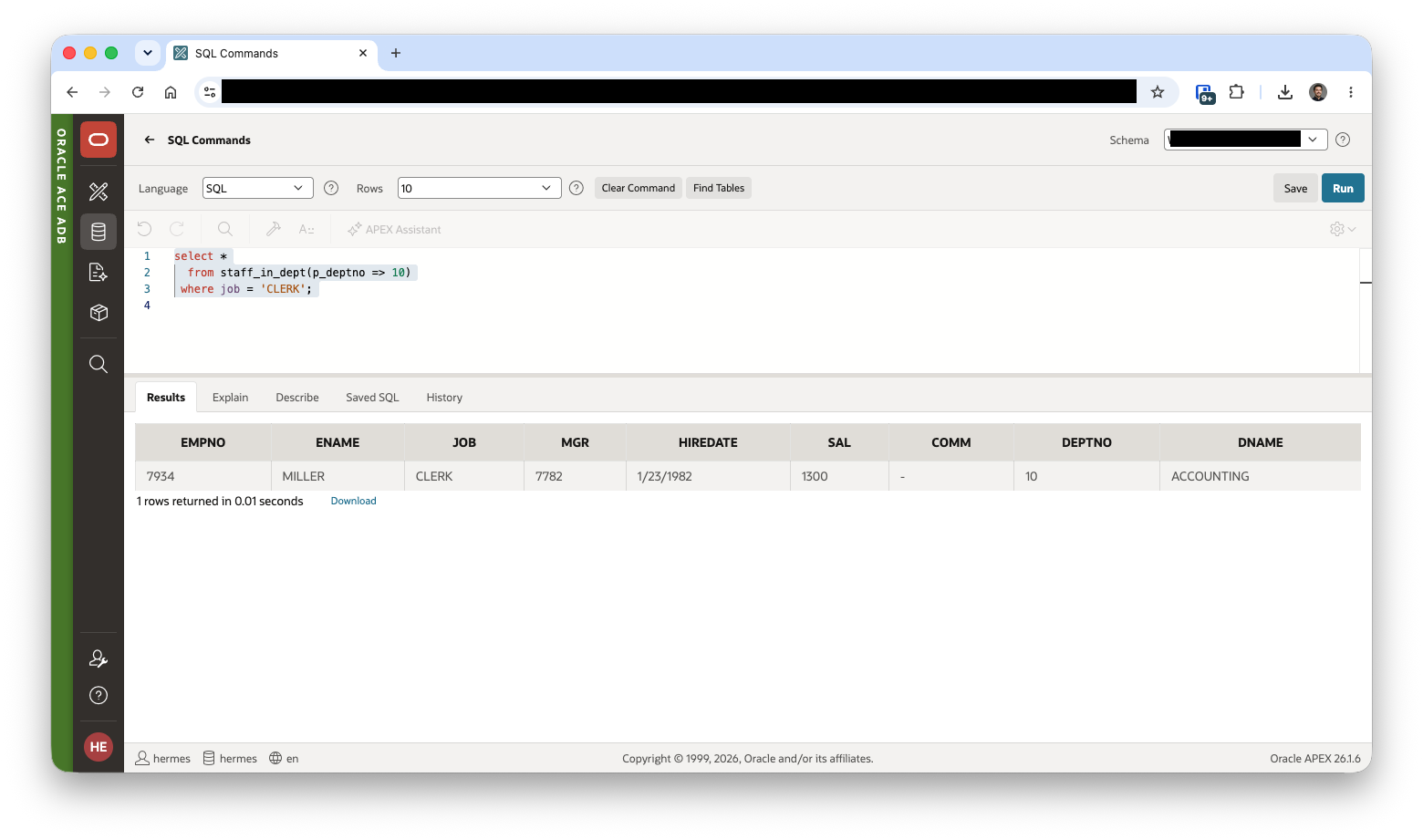
Then you use it like a table in the from clause:
select *
  from staff_in_dept(p_deptno => 10)
 where job = 'CLERK';
Wait, what? That's all we have to do? Yes, pretty much. A few details I found in the documentation:
- The kind of macro depends on what follows
as:- a scalar expression gives a scalar macro
- an unparenthesized query gives a table macro
- a query in parentheses gives a scalar macro that returns a scalar subquery
asandisare the same.or,replaceandif not existsexist, but not together.- The SQL is validated when you create the macro, so typos fail at creation time and not in production.
- You can use positional or named notation, and scalar parameters can have a
default.
Using it in Oracle APEX
Now the interesting part. Where can an APEX developer benefit from this?
One query for several pages
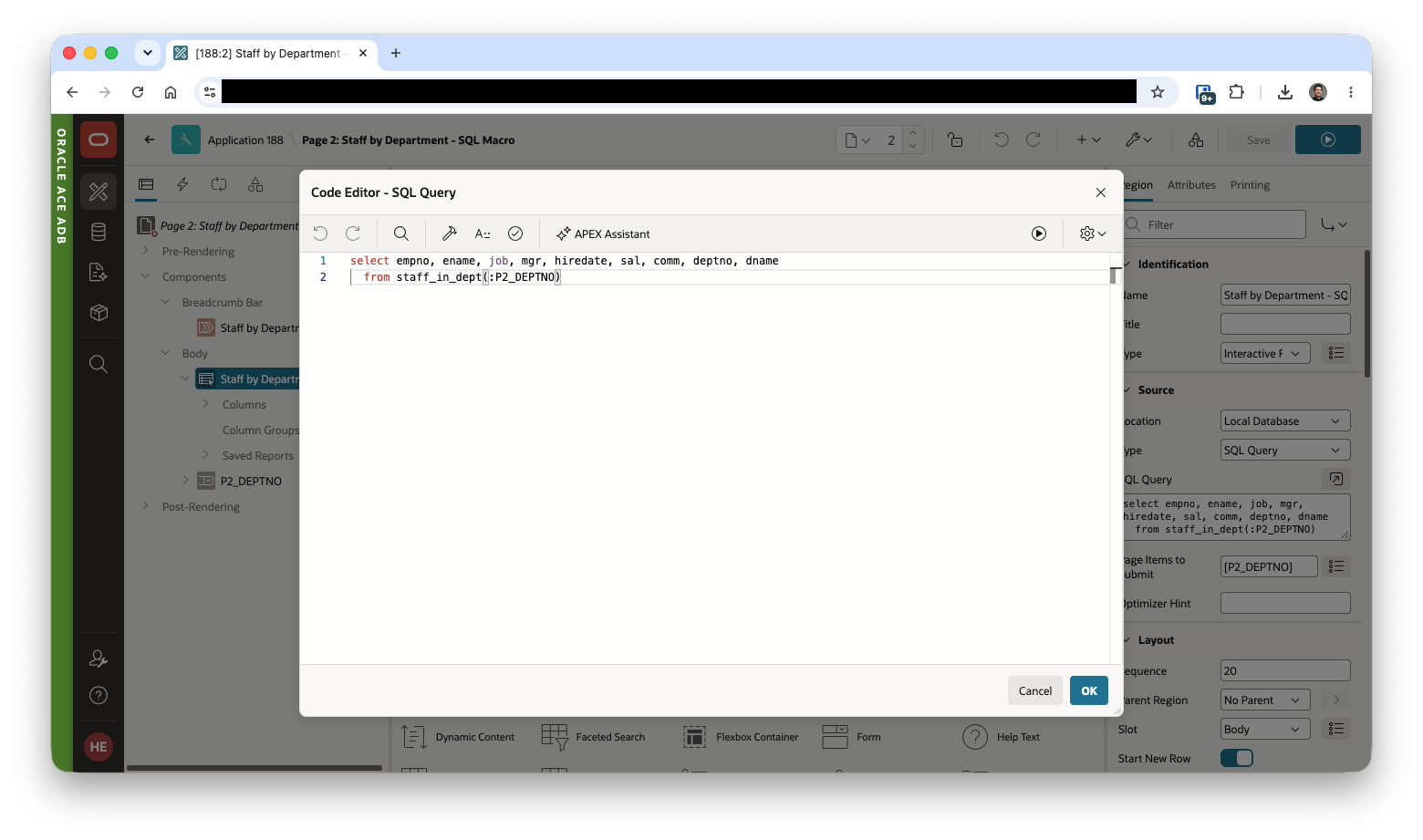
A table macro is a parameterized view. The same region source can be used on several pages, and each page passes its own page item:
select *
  from staff_in_dept(:P10_DEPTNO)
When the rule changes, you change one macro and every region follows.
A reusable predicate
A scalar macro that returns a Boolean must be enclosed in parentheses. This gives you a named business rule you can use in a where clause:
create or replace macro is_high_earner (p_sal number) as
  (p_sal >= 3000);
select ename, sal
  from emp
 where is_high_earner(sal);
Instead of sal >= 3000 repeated everywhere, the rule has a name. I like this for "active", "overdue" or "visible to this role" conditions, because the name documents the intent. 🤓
One report for many tables
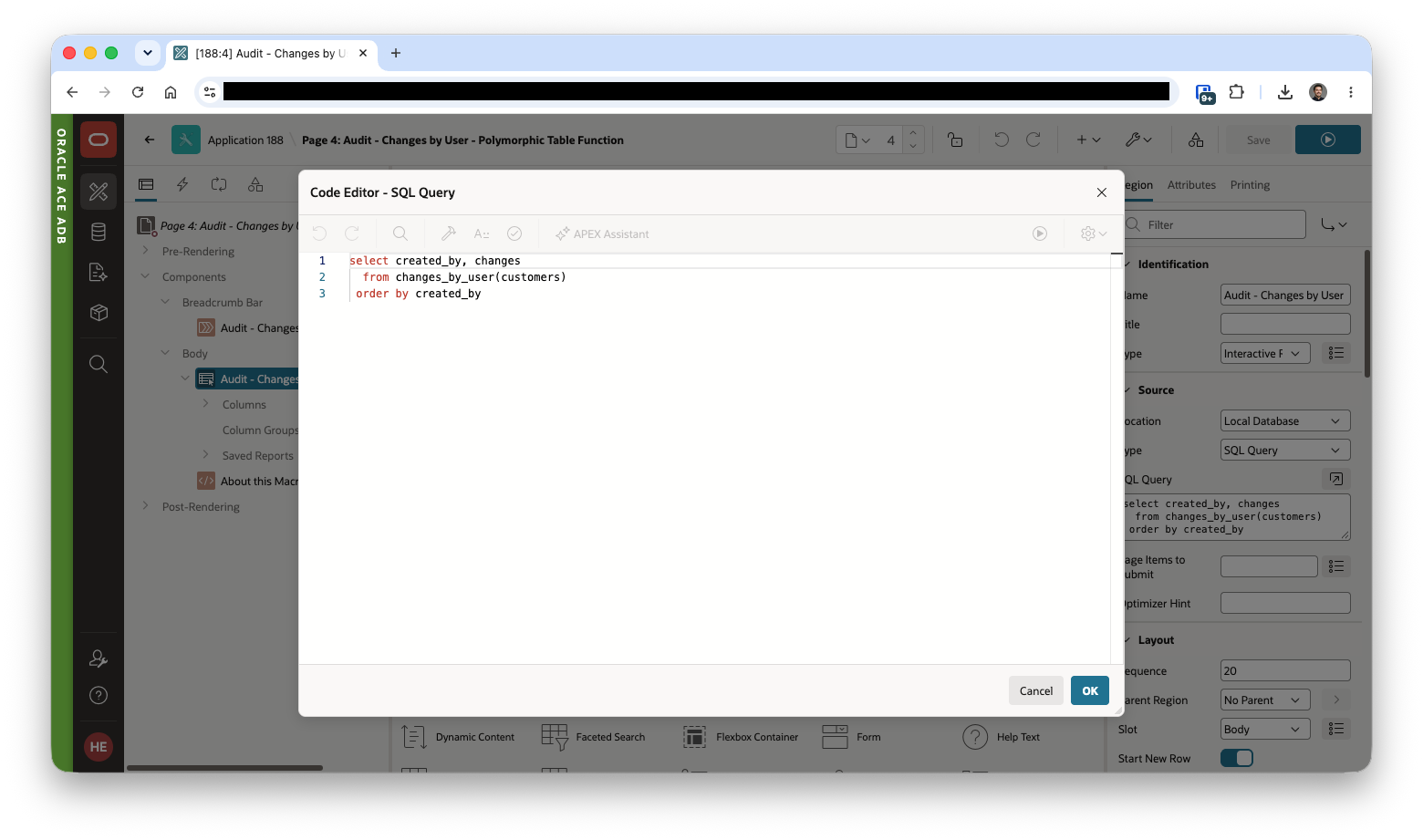
This is the one I like the most. A macro can take a table parameter. If you list columns, the macro only accepts tables that have these columns. Extra columns and a different column order are fine.
If your tables share audit columns (the ones Quick SQL can add, created and created_by), you can write one macro and use it on all of them:
create or replace macro changes_by_user (
  t      table (created date, created_by varchar2),
  p_days number default 7
) as
  select created_by, count(*) as changes
    from t
   where created >= sysdate - changes_by_user.p_days
   group by created_by;
select * from changes_by_user(orders);
select * from changes_by_user(customers, p_days => 30);
One macro, one report, any table that follows your conventions. Pretty smart, isn't it?
Bind a macro to a table
With the on clause you can bind a scalar macro to one table or view:
create or replace macro check_title (p_title varchar2) on emp as
  (job = upper(p_title));
The documentation also shows these macros inside data grants, to define a reusable access predicate. I did not test that part yet, so I will keep it for another post.
Things that you might want to know
I read the reference page, and these are the points I would keep in mind.
- Parameter or column? If a name matches both a macro parameter and a column, Oracle picks the parameter. Qualify the parameter with the macro name (
staff_in_dept.p_deptno) and the column with a table alias. This is why I prefix my parameters withp_and still qualify them. - Privileges. You need
create procedureto create a macro in your schema. To call a macro from another schema, you needexecuteon it, and the caller needs access to the objects behind the expanded SQL. In APEX, think about your parsing schema. - Where you can call them. A scalar macro only where a scalar expression is allowed. A table macro only in the
fromclause. - The table argument is not a bind variable.
changes_by_user'stparameter must be a literal object name, you cannot bind it to a page item. So you cannot build one dynamic APEX region where the user picksordersvscustomersat runtime, you need a region per table, or a dynamic action that swaps between two static macro calls as the region source. - Boolean macros need parentheses**.**
- A macro name must be unique in the schema namespace, so it cannot share a name with a table or a view.
- A scalar default must be a constant. A table parameter cannot have a default.
- Type constraints are ignored. If you write
varchar2(10)for a parameter, the length is not used to resolve or invoke the macro. - Version. Everything here needs 23.26.4. Check your database before you export an app that depends on it.
- Debugging. You can see your macros in
user_macrosanduser_macro_parameters, with full column and parameter metadata. The legacysql_macrofunction does not show up there, only the new syntax does, which is a handy way to tell them apart. As for execution plans, I checked:staff_in_deptfully inlines,explain planshows a plain nested loops with thejob = 'CLERK'predicate pushed straight down into theemptable access. The optimizer treats it exactly like hand-written SQL, no macro overhead. I still have not looked at how it shows up in APEX debug.
Conclusion
I think simplified macros fill a gap: more reusable than copy and paste, lighter than a pipelined function, and easier to read than a PL/SQL function returning a string. For APEX developers, the table macro as a shared region source and the predicate macro as a named business rule are the two I will try first.
One wish: I would love to see macros listed in the our tools (Object Browser, SQL Developer for vscode extension or Database Actions) next to views and functions.
Thanks to the Oracle Database team for bringing features like this in a release update. I hope you enjoyed reading this, and if you try it, drop me a comment to tell me which macro you built first. Feedback and issues are very welcome! 🤓
References
About the author
Oracle APEX Developer (Insum) from Paris Contributor of Flows for APEX Passionate about APEX and web development.
Comments
Join the discussionNo comments yet. Be the first to comment.